The Audio Converter26.1.0
Publisher Description


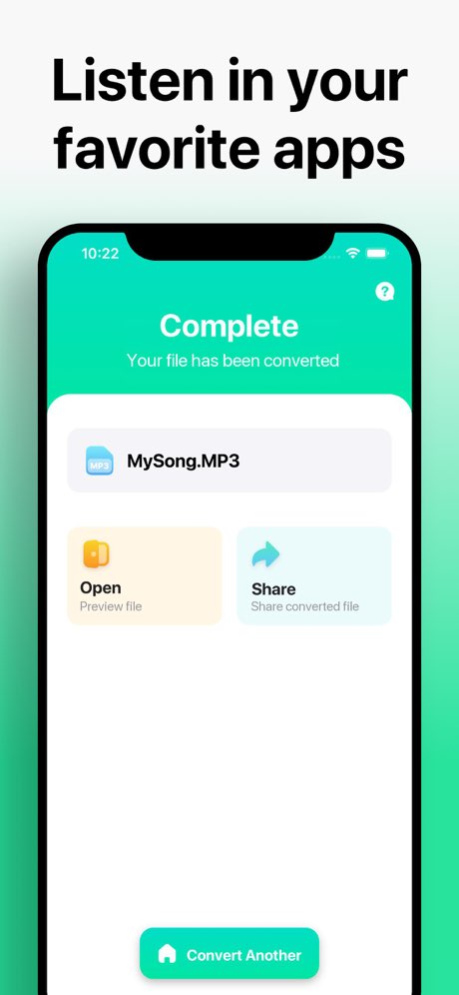

Quickly convert your audio or video files to nearly any audio format!
1. Select your input file
2. Choose your output format ( MP3, WAV, M4A, AAC etc. )
3. Convert! It will only take a few seconds.
4. Save your file, or open it in your favorite app!
Here are the video and audio output formats you can choose from:
MP3, M4A, AAC, FLAC, OGG, WAV, WMA, AIFF
You can convert from dozens of input formats, here are some of the most popular formats we support converting from:
MOV, M4A, MP3, WMA, MP4, WAV, OGG, OPUS, AMR, AAC, WEBM, MID and many more!
Save, Share or Listen to your converted audio files in your favorite apps immediately. You can even browse your previously converted files with our in-app file browser.
After conversion, you can immediately AirDrop your files right to your Mac or another device.
Conversions usually take less than 15 seconds!
Conversion is done on a secure cloud server, which makes conversion easier, faster and much more battery-friendly. You must have an internet connection to use this app. Files are immediately deleted from the server after conversion. While the files are immediately deleted after conversion or cancellation, you should be aware that by using this app, you agree that your files will be sent over to internet from the app to the conversion server.
We've also recently added support for local conversions for many popular conversion types. These conversions don't require a server, and are usually done almost instantly! We are continuing to add support for more local conversions with each update.
This app includes an optional auto-renewable subscription (Premium Pass): Premium Pass beings with a free trial period, then an auto-renewable monthly subscription when trial ends. Payment will be charged to your Apple account at confirmation of purchase and will automatically renew (at the duration/price selected) unless auto-renew is turned off at least 24 hrs before the end of the current period. Account will be charged for renewal within 24-hours prior to the end of the current period. Current subscription may not be cancelled during the active subscription period; however, you can manage your subscription and/or turn off auto-renewal by visiting your Apple Account Settings after purchase. Any unused portion of the free initial period will be forfeited when you purchase a subscription.
Privacy Policy: https://float.support/the-audio-converter/privacy
Terms of Use: https://float.support/the-audio-converter/terms
Version History Fixed a bug affecting some legacy users 26.1.0 Apr 5 Fixed a rare crash 26.0.4 Feb 12 - Updates for iOS 26 26.0.2 12/14/2025 - Bug fixes, and streamlined some UI/menus 12.8.0 11/24/2023 Added new options to the UI 12.6.6 02/17/2023 Fixed a crash that was affecting a small number of users, and improved conversion support. 12.5.4 07/05/2022 Fixed some minor issues and improved support for local conversion to more output formats. 12.5.0 04/27/2022 Added support for more local conversions, and fixed a crash found in 12.3.0 12.4.0 01/13/2022 Fixed a bug where some files wouldnt convert if they had a space in the filename. 12.3.0 07/24/2021 Fixed a crash related to localization settings. 12.2.1 05/19/2021 New support for more local conversion types. 12.2.0 05/11/2021 Fixed a crash found in 12.1.3. 12.1.4 03/28/2021 • Added iOS 14 privacy feature so the app no longer requests access to your media library
• Fixed any known major bugs
• New, cleaner and easier UI
• New History and Settings screens 12.1.3 03/18/2021 Fixed a bug that occurred in some languages 11.4.0 04/25/2020 Bug fixes and further improvements 11.3.1 11/20/2019 FIxes a bug in iOS 13 that would cause error when converting an imported file. 11.1 10/16/2019 Made improvements to the UI to make it more clear for users. 11.0 02/11/2019 Bug fixes and language improvements 10.6.1 07/24/2018 - Fixed bug that caused crash on launch for some users. 10.3.1 05/25/2018 - Brand new UI for iPhone X
- More supported extensions
- Bug fixes 10.1 04/28/2018 Bug fixes 3.1 09/26/2016 Support for more languages 2.5 05/02/2015 Minor bug fixes 2.1 03/26/2015 Minor bug fixes 2.0 03/09/2015 Minor bug fixes 1.3 10/29/2014
About The Audio Converter
The company that develops The Audio Converter is Float Tech, LLC. The latest version released by its developer is 26.1.0.
To install The Audio Converter on your iOS device, just click the green Continue To App button above to start the installation process. The app is listed on our website since 2026-10-14 and was downloaded 8 times. We have already checked if the download link is safe, however for your own protection we recommend that you scan the downloaded app with your antivirus. Your antivirus may detect the The Audio Converter as malware if the download link is broken.
How to install The Audio Converter on your iOS device:
- Click on the Continue To App button on our website. This will redirect you to the App Store.
- Once the The Audio Converter is shown in the iTunes listing of your iOS device, you can start its download and installation. Tap on the GET button to the right of the app to start downloading it.
- If you are not logged-in the iOS appstore app, you'll be prompted for your your Apple ID and/or password.
- After The Audio Converter is downloaded, you'll see an INSTALL button to the right. Tap on it to start the actual installation of the iOS app.
- Once installation is finished you can tap on the OPEN button to start it. Its icon will also be added to your device home screen.
Program Details
System requirements
Download information
Pricing
Version History
version 26.1.0
posted on 2026-10-14
Version History Fixed a bug affecting some legacy users 26.1.0 Apr 5 Fixed a rare crash 26.0.4 Feb 12 - Updates for iOS 26 26.0.2 12/14/2025 - Bug fixes, and streamlined some UI/menus 12.8.0 11/24/2023 Added new options to the UI 12.6.6 02/17/2023 Fixed a crash that was affecting a small number of users, and improved conversion support. 12.5.4 07/05/2022 Fixed some minor issues and improved support for local conversion to more output formats. 12.5.0 04/27/2022 Added support for more local conversions, and fixed a crash found in 12.3.0 12.4.0 01/13/2022 Fixed a bug where some files wouldnt convert if they had a space in the filename. 12.3.0 07/24/2021 Fixed a crash related to localization settings. 12.2.1 05/19/2021 New support for more local conversion types. 12.2.0 05/11/2021 Fixed a crash found in 12.1.3. 12.1.4 03/28/2021 • Added iOS 14 privacy feature so the app no longer requests access to your media library
• Fixed any known major bugs
• New, cleaner and easier UI
• New History and Settings screens 12.1.3 03/18/2021 Fixed a bug that occurred in some languages 11.4.0 04/25/2020 Bug fixes and further improvements 11.3.1 11/20/2019 FIxes a bug in iOS 13 that would cause error when converting an imported file. 11.1 10/16/2019 Made improvements to the UI to make it more clear for users. 11.0 02/11/2019 Bug fixes and language improvements 10.6.1 07/24/2018 - Fixed bug that caused crash on launch for some users. 10.3.1 05/25/2018 - Brand new UI for iPhone X
- More supported extensions
- Bug fixes 10.1 04/28/2018 Bug fixes 3.1 09/26/2016 Support for more languages 2.5 05/02/2015 Minor bug fixes 2.1 03/26/2015 Minor bug fixes 2.0 03/09/2015 Minor bug fixes 1.3 10/29/2014
version 26.0.4
posted on 2026-02-12
Fixed a rare crash
version 26.0.2
posted on 2025-12-14
- Updates for iOS 26
version 12.8.0
posted on 2023-11-24
Nov 24, 2023
Version 12.8.0
- Bug fixes, and streamlined some UI/menus
version 12.6.6
posted on 2023-02-17
Feb 17, 2023
Version 12.6.6
Added new options to the UI
